
Visual Content

Creating Visual Content with GenAI

Attribution

Original work: "Educators' guide to multimodal learning and Generative AI" β€” TΓΌnde Varga-Atkins, Samuel Saunders, et al. (2024/25) β€” CC BY-NC 4.0
Adapted for UK Nursing Education by: Lincoln Gombedza, RN (LD)
Last Updated: December 2025

Educators can use Generative AI to create rich visual content that enhances nursing education across multiple contextsβ€”from academic posters and presentations to interactive learning materials and clinical demonstrations.

What You Can Create​

1. Generate Images for Teaching Materials​

Use GenAI to create:

  • πŸ“Š Diagrams and flowcharts for care pathways
  • πŸ–ΌοΈ Icons and visual elements for infographics
  • πŸ“ Academic posters and presentations
  • 🎨 Visual metaphors for abstract nursing concepts

Nursing Examples:

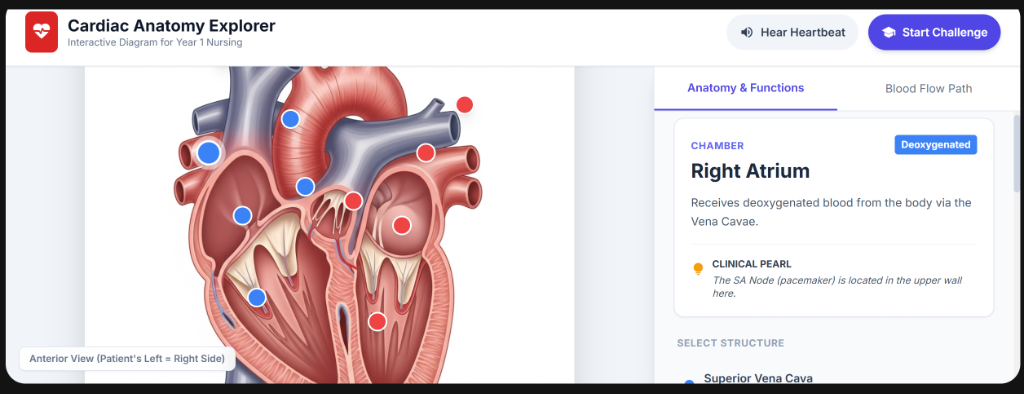
Example 1: Anatomy Diagrams

Prompt: "Create a detailed cross-sectional diagram of the human heart showing 
the four chambers, major blood vessels, and direction of blood flow. Use medical
illustration style with clear labels. Suitable for Year 1 nursing students."
Example 2: Infection Control Flowchart

Prompt: "Create a visual flowchart showing the chain of infection: infectious agent, 
reservoir, portal of exit, means of transmission, portal of entry, and susceptible host.
Include examples at each stage. Use NHS color scheme."

Example 3: Medication Administration Icons

Prompt: "Create a set of simple, clear icons representing the 5 Rights of medication 
administration (Right patient, Right drug, Right dose, Right route, Right time).
Minimalist style, suitable for infographic use."

2. Create Multimodal Elements for Infographics​

Transform financial concepts, clinical data, or evidence-based practice into visual infographics.

πŸ’‘ Advanced Text Rendering
Modern AI image generators (including Gemini 3.0, DALL-E 3, and Midjourney v7) now support accurate text rendering within images. You can create fully labeled diagrams, infographics, and educational posters without external editing tools.

Nursing Example: Sepsis Six Care Bundle

Prompt: "Create a detailed infographic showing the Sepsis Six care bundle. 
Include 3 tests (blood lactate, blood cultures, urine output) and 3 treatments
(oxygen, IV fluids, antibiotics). The text must be perfectly spelled and legible.
Use clear icons and NHS branding colors. Make it suitable for A4 poster printing."

3. Localization & Multilingual Resources​

Advanced Capability: Modern AI models can translate text within existing images while preserving layout and design.

  • Use Case: Take an English "Stroke Awareness (FAST)" poster and regenerate it in Polish, Urdu, or Spanish for diverse patient populations.
  • Prompt: "Translate all the text in this image into Spanish while maintaining the original layout and NHS branding."
  • Best Tools: Gemini 3.0 Flash, GPT-5.2 with vision capabilities

4. Generate Visual Metaphors​

Use GenAI-generated images to represent abstract concepts, combining visuals with reflection.

Nursing Example: Person-Centred Care

Prompt: "Create a visual metaphor representing person-centred care in nursing. 
Show a patient at the center surrounded by healthcare professionals, family, and
various aspects of holistic care (physical, emotional, social, spiritual). Watercolor
illustration style, warm and compassionate tone."

5. Create Educational Videos and Animated Explainers​

Generate short educational videos or animated explainers from written prompts, using motion graphics and narration.

Nursing Example: Hand Hygiene Technique

Step 1: Write script with ChatGPT
"Create a 60-second script explaining the WHO 5 Moments for Hand Hygiene in
healthcare settings. Use simple language suitable for nursing students."

Step 2: Generate visuals with DALL-E
"Create 5 simple icons representing: before patient contact, before aseptic procedure,
after body fluid exposure, after patient contact, after contact with patient surroundings."

Step 3: Combine in video tool (e.g., Synthesia, HeyGen)
- Add AI narration
- Animate the icons
- Export as educational video

Sample Prompts for Nursing Education​

Academic Poster Generation​

I'm a nursing lecturer preparing an academic poster on [evidence-based practice 
in wound care]. Please suggest a list of AI-generated image ideasβ€”such as
conceptual diagrams, icons, or illustrative visualsβ€”that can help convey the
idea of [the wound healing cascade] visually, minimising the need for dense text.

The visuals should be intellectually rigorous, clear, and appropriate for a UK
nursing education audience aligned with NMC standards. Feel free to include
suggested labels or annotations.

Tips for Better Prompts:​

  • Be specific about the nursing context
  • Mention the student level (Year 1, Year 2, etc.)
  • Specify style (medical illustration, infographic, icon, diagram)
  • Include color preferences (NHS colors, professional palette)
  • State the purpose (teaching, assessment, clinical reference)

Tools for Visual Content Creation​

Text-to-Image AI:​

  • Gemini 3.0 Flash (Google) β€” Lightning-fast image generation with excellent text rendering and multimodal reasoning.
  • DALL-E 3 (OpenAI, via GPT-5.2) β€” Integrated conversational image generation, improved text accuracy.
  • Midjourney v7 β€” Best for artistic photorealism and stylized medical illustrations.
  • Adobe Firefly β€” Commercially safe, ethically trained, integrated with Adobe Suite.

Diagram and Flowchart Tools:​

  • Gemini 3.0 Flash + Mermaid β€” Generate complex flowcharts and diagrams directly from text.
  • GPT-5.2 / Claude Opus 4.5 β€” Advanced text-to-diagram generation with reasoning
  • Lucidchart β€” Professional flowcharts
  • Canva β€” User-friendly design platform with AI features

Video Creation:​

  • Synthesia β€” AI avatar videos with narration
  • HeyGen β€” Create talking head videos
  • Pictory β€” Convert text to video automatically

Best Practices for Nursing Educators​

βœ… DO:​

  • Verify anatomical accuracy against textbooks and medical atlases
  • Check clinical procedures against NICE guidelines and NMC standards
  • Use AI visuals to supplement (not replace) real clinical images
  • Document your prompts for reproducibility
  • Test with students for clarity and understanding

❌ DON'T:​

  • Rely solely on AI for critical clinical information
  • Use AI-generated patient images without considering ethical implications
  • Assume all AI-generated anatomy is correct
  • Share AI visuals without verification
  • Use copyrighted or patient-identifiable information in prompts

Case Study Summary: Improving Engagement with eLearning​

From original guide: Vivien Shaw, Northern College of Acupuncture

Created short, multimodal 'explainer' videos to link digital content with in-person learning outcomes. Using tools like Microsoft Word's transcribe function and ChatGPT:

  1. Summarised hour-long online sessions
  2. Mapped to relevant learning outcomes
  3. Generated slide decks
  4. Created 10-minute narrated videos

Results:

  • Significantly reduced student anxiety
  • Clarified expectations for assessment
  • Highly valued for accessibility and structure

Nursing Adaptation: Apply this approach to:

  • Complex pharmacology topics
  • Pathophysiology processes
  • Care planning frameworks
  • Clinical skills procedures

Activity for Your Practice​

Try creating your own nursing visual:

  1. Choose a nursing concept you teach (e.g., the nursing process, Maslow's hierarchy)
  2. Write a detailed prompt describing what you want
  3. Generate the image using DALL-E, Midjourney, or Adobe Firefly
  4. Critically evaluate: Is it anatomically/clinically accurate?
  5. Refine your prompt and regenerate
  6. Share with colleagues for feedback

Reflection questions:

  • How long did it take compared to finding/creating manually?
  • What did you learn about prompt engineering?
  • How could you use this in your teaching?
  • What are the limitations you encountered?

Next: Explore Teaching Delivery to learn how to integrate AI into your lectures and seminars!